
The Local AI Hardware Dilemma of 2026
VRAM is the new gold in 2026. Now that models such as Llama 4 and newer Mistral variants continue to push the limits of memory with each passing few months, it has never been more important to select the appropriate GPU to run local AI.
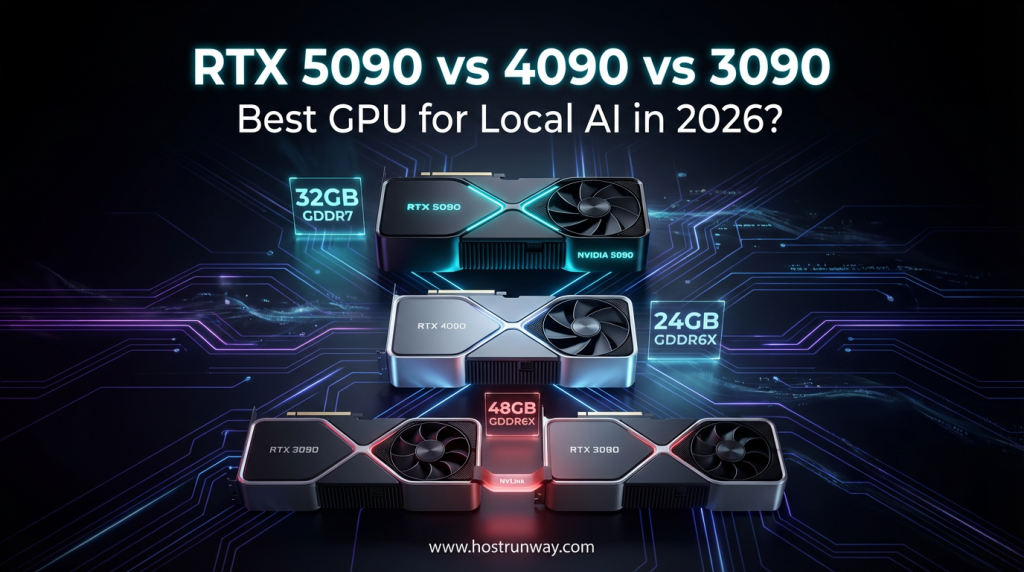
Here we pit three of the more serious competitors against each other: RTX 5090 vs 4090 for AI loads, as well as the budget low-end option, the used RTX 3090.
Here is a quick look at who we are comparing:
- RTX 5090 (Blackwell): The latest, the quickest, and the priciest one on the block. Developed to work with gravest AI tasks.
- RTX 4090 (Ada Lovelace): It is a workhorse. Top standards, a little older architecture.
- Used RTX 3090 (Ampere): The cheap ruler. 24GB VRAM below $700 in 2026. Surprisingly competitive.
The short answer: Choose 5090 in case of the desire to be fast and future-proof. Two secondhand 3090s could be of interest to you should you desire to get as much VRAM as possible at a low price. You’ve read so far and you still need to read.
Also Read : GPUs for Scientific Simulations: Accelerating Physics and Biology Research in 2026
VRAM Capacity and Bandwidth – The Make-or-Break Metric
VRAM is all about the execution of large language models on a local machine. It determines what models you boot-up, their performance levels, and whether you slide the wall at 13B parameters, or fly at 70B.
The 32GB vs 24GB VRAM Gap
RTX 5090 introduces 32GB GDDR7 memory. The additional 8GB compared to the 4090 and 3090 allows bigger 4-bit quantized models. You have better head room and larger context windows and batches.
The 4090 and 3090 both sit at 24GB. The 24GB remains sufficient in 2026 on most workloads by hobbyist and mid-level users. However, when you have 70B-class models and you are running them in GGUF or EXL2 format, it is going to squeeze.
Memory Bandwidth: GDDR7 vs GDDR6X
It is here that the 5090 makes its big way. The bandwidth of GDDR7 is much higher than GDDR6X. Practically, tokens move at a higher rate. Inference feels snappier. You spend less time in between responses.
The 3090 employs an older GDDR6X that is good but is proving to be old when handling large models.
The Used RTX 3090 Advantage
The most important point that most people fail to notice is that a Used RTX 3090 for LLM 2026 workloads can still be found at less than 700 dollars in most markets. At this price, 24GB of VRAM is included. That is a bargain that one cannot afford to miss out particularly to the developers who are just warming up to local AI.
Also Read : GPUs for Everyday AI Assistants: Building Smarter Tools in 2026
Architectural Leap – Blackwell’s FP4 vs Legacy Precision
The RTX 5090 consists of the Blackwell architecture. The 4090 uses Ada Lovelace. The 3090 runs on Ampere. With every generation, AI capability gets improved by a step.
Native FP4 Support on Blackwell
It is among the largest strengths that the 5090 has. Blackwell hardware is supported as a 4-bit floating point (FP4). What does that mean for you? It doubles the effective capacity of VRAM of compatible models. In theory, a 32GB card acts as a 64GB one, running workloads that are optimized to FP4.
The 4090 does not have native FP4 but it has INT4 quantization. INT8 and FP16 both are restricted to full speed with the 3090. Even older cards can still run 4-bit quants though not as efficiently.
Tensor Core Generations Compared
| GPU | Architecture | Tensor Core Gen | Key AI Precision |
| RTX 5090 | Blackwell | 5th Gen | FP4, FP8, FP16 |
| RTX 4090 | Ada Lovelace | 4th Gen | INT4, FP8, FP16 |
| RTX 3090 | Ampere | 3rd Gen | INT8, FP16 |
Inference Speed: Tokens Per Second
For a 70B model in 4-bit quant format, expect roughly:
- RTX 5090: 35 to 50 tokens per second (estimated, GGUF Q4)
- RTX 4090: 20 to 28 tokens per second
- RTX 3090: 12 to 18 tokens per second
The 5090 is noticeably faster. In the case of production pipelines and real-time applications, such a gap is important.
Also Read : Unlocking AI Power in 2026: Top GPUs from RTX 5090 to Affordable Picks for Smarter Setups
The Multi-GPU Factor – NVLink vs PCIe 5.0
The following fact cannot escape the attention of many buyers, the RTX 3090 also NVLink to build a two-gpu configuration. The 4090 and 5090 do not.
The 3090’s Secret Weapon
When you have two RTX 3090s that are connected at the NVLink, you will have a total of 48GB of combined VRAM. That is more than a single RTX 5090. It is a serious benefit of 48GB to do big model inference. It is possible to load models that cannot fit on any of the currently available single consumer GPUs.
That is why a 2-3090 can be considered competitive in 2026, despite the newer cards.
PCIe Gen 5.0 and the 5090
RTX 5090 uses PCIe 5.0 that doubles the interface bandwidth in comparison to PCIe 4.0. Although it is not used in lieu of NVLink in regard to VRAM pooling, it aids in transfers between the CPU and the GPU. This is important in the case of large datasets flowing into the training process.
In case your motherboard has PCIe 5.0, you are able to enjoy the full advantage. Most newer 2025 and 2026 platforms do.
Power Efficiency and Cooling – The Hidden Costs
Purchasing an expensive graphics card is just the beginning. Costs are revealed in the running of it.
Total Cost of Ownership
- RTX 5090: It can consume up to 600W during peak power. That is significant.
- RTX 4090: Around 450W at full load. A 4090 undervolted can be brought to 300W to a minimum performance loss.
- RTX 3090: Around 350W. Well-learned and efficient by 2026.
A difference of that power draw in one year of heavy usage translates to real money in your electricity bill.
PSU Requirements
In the case of the RTX 5090, expect to use a 1600W power supply in the event that you are driving a powerful CPU and other components as well. A 4090 works with a 1000W in most constructions. The 3090 is happy with 850W.
Cooling in 2026
Blackwell cards run hot. Custom cooling solutions are now much better than they were in 2024, however, good airflow in your case is still required. Both the 4090 and 3090 are compatible with the aftermarket coolers, thereby reducing noise and thermals significantly.
Real-World Benchmarks – LLM Inference and Training
Now that we have this out of the way, how do these cards actually do on real AI tasks?
Inference Speed by Format
| Task | RTX 5090 | RTX 4090 | RTX 3090 (x1) |
| Llama 3.1 70B (GGUF Q4) | 45 tok/s | 24 tok/s | 15 tok/s |
| Mistral 22B (AWQ) | 80 tok/s | 50 tok/s | 30 tok/s |
| EXL2 13B | 120 tok/s | 75 tok/s | 50 tok/s |
Note: This data is estimated according to architectural estimates and community standards that are accessible at the beginning of 2026.
Fine-Tuning and LoRA Training
Most tasks in LoRA fine-tuning are easily completed with one RTX 5090 having 32GB VRAM. The 4090 supports models up to 13B to 30B based on a batch size. The 3090 is restricted and yet comes handy in minor fine tuning work.
However, 2 x 3090 can compete with 1 x 5090 in specific training sequences due to 48GB of joint VRAM.
Image Generation Bonus
If you also use Stable Diffusion or Flux models:
- RTX 5090: Fastest. Apparently much faster on SDXL and Flux.1 working.
- RTX 4090: Strong. Only slightly behind the 5090.
- RTX 3090: Still capable. SDXL can be handled at full resolution.
Also Read : How to Choose the Right GPU for Your AI Project in 2026 – A Complete Guide
Price-to-Performance Analysis
Here is what the market looks like in 2026:
GPU Pricing Overview
| GPU | Approx. Price (2026) | VRAM | Cost Per GB VRAM |
| RTX 5090 | $2,000 to $2,500 | 32GB | $70/GB |
| RTX 4090 (used) | $900 to $1,100 | 24GB | $42/GB |
| RTX 3090 (used) | $550 to $700 | 24GB | $26/GB |
| Dual RTX 3090 | $1,100 to $1,400 | 48GB | $27/GB |
The RTX 3090 which is used has a wide margin on cost per GB. The 5090 is priced to be fast, FP4 and future-proof. The 4090 is in the mid-range.
This is where server grade GPU infrastructures can be considered by teams with AI workloads at scale. Hostrunway also provides dedicated GPU servers that come with a choice of NVIDIA H100 and A100 cards and is available in 160 or more locations around the world. The absence of lock-in times, 24/7 human support and the ability to bill as needed makes it a good choice to ML teams that are willing to go beyond what a single consumer GPU can provide.
Who Should Buy What? – Persona-Based Advice
The optimal GPU to construct local AI will be based solely on what you are creating and what you are ready to pay.
The Pro Developer
You are creating AI applications that are production-ready. Speed matters. Context windows are growing. FP4 support and 2027 headroom will be required.
Go with the RTX 5090. The Blackwell vs Ada Lovelace AI benchmarks make it clear: FP4, GDDR7, and the 5th Gen Tensor Core are purpose-built for serious 2026 workflows.
The Hobbyist or Side-Project Developer
You run local LLMs for fun, experimentation, or small projects. You do not need to be first with every new model.
The RTX 4090 is your sweet spot. Great speed, proven reliability, 24GB VRAM, and a used market price that has become much more reasonable in 2026.
The Budget Architect
You want maximum model capacity without paying premium prices. You are comfortable with a slightly more complex setup.
Two used RTX 3090s beat a single 5090 for raw VRAM. 48GB via NVLink opens up models the 5090 cannot touch on a single card. The dual 3090 setup is still one of the best values in the 32GB VRAM GPU comparison category in 2026.
Also Read : Best GPUs for AI, Big Data Analytics, and VR Workloads in 2026: A Complete Hosting Guide
Conclusion – Is the Upgrade Worth It?
This is the ultimate decision about this Best VRAM GPU for Local AI comparison.
The RTX 5090 would be the correct choice in the case of speed and FP4 efficiency plus the need to have the ability to future-proof your set-up until at least 2027. It operates in tokens per second and works with bigger quants with much more ease than any other consumer graphics card.
The used RTX 3090 used is the correct choice when you are looking to spend the least amount of money and gain as much VRAM as possible. NVLink connections between two units provide you with 48GB and this would be really useful in 2026 when large model inference is made possible.
The mid price range is occupied by the RTX 4090: it performs well, has 24GB VRAM, no NVLink, and costs more, which qualifies it as a good all-rounder.
2027 Outlook
The level of digitization is improving each year. 2025 models with 48GB VRAM can be used today with intelligent compression at 24GB. The difference between these cards will be further reduced by 2027. If you buy the 5090 now, you buy time. When you purchase VRAM volume, you purchase the 3090 currently.
Cloud-based GPU infrastructure is something to give serious consideration to in teams that go beyond the scope of a single GPU. Hostrunway dedicated GPU servers provide ML teams with access to data center grade cards available on 160+ locations across the world with instant provisioning and no long term contract. A 3090 vs 5090 machine learning, will 24GB VRAM be sufficient in 2026, or any of the questions about whether the volume of work you will do will justify a particular choice, the answer will be, more often than not, about the volume of work you are going to do and, frankly, your budget.
FAQs
1. How much VRAM does the RTX 5090 have compared to the RTX 4090?
The RTX 5090 has 32GB of GDDR7 VRAM. The RTX 4090 has 24GB of GDDR6X. The difference in 8GB is also significant in executing larger quantized models on the local environment.
2. Can an RTX 3090 still run the latest 2026 LLMs effectively?
Yes, for many models. One RTX 3090 is capable of working with 7B to 30B parameter models in 4-bit format. This is expanded to bigger models, with 48GB combined VRAM, by two cards over NVLink.
3. Does the RTX 5090 support NVLink for multi-GPU AI workstations?
No. Both the RTX 5090 and the RTX 4090 do not have NVLink. NVLink connectors to support consumer multi-GPUs are only present on the RTX 3090 (and older Ampere cards).
4. Is the speed difference between GDDR6X and GDDR7 noticeable in AI inference?
Yes. The GDDR7 of RTX 5090 has much more memory bandwidth. The 4090 and 3090 will have slower token generation and will take longer to load than GDDR6X.
5. Why is the RTX 3090 still so popular for local AI in 2026?
Price and VRAM. VRAM of 24GB is difficult to compete with at less than 700 dollars used. NVLink two-card configurations and you have 48GB of effective VRAM at a quarter of the price of the 5090.
6. Will I need a new power supply (PSU) to upgrade to the RTX 5090?
Likely yes. The RTX 5090 has a peak load of 600W. The recommended power supply of a full workstation is 1600W PSU. In case you are approaching a 4090 with a 1000W PSU, there is a likelihood of the upgrade.
7. Can a single RTX 5090 outperform a dual RTX 3090 setup for large models?
On speed, yes. The 5090 is quicker in the production of tokens, and it manages inference more effectively. However, with raw VRAM capacity, the dual 3090 is the winner with 48GB compared to 32GB of the 5090. It is up to you to decide whether you want speed or large models.