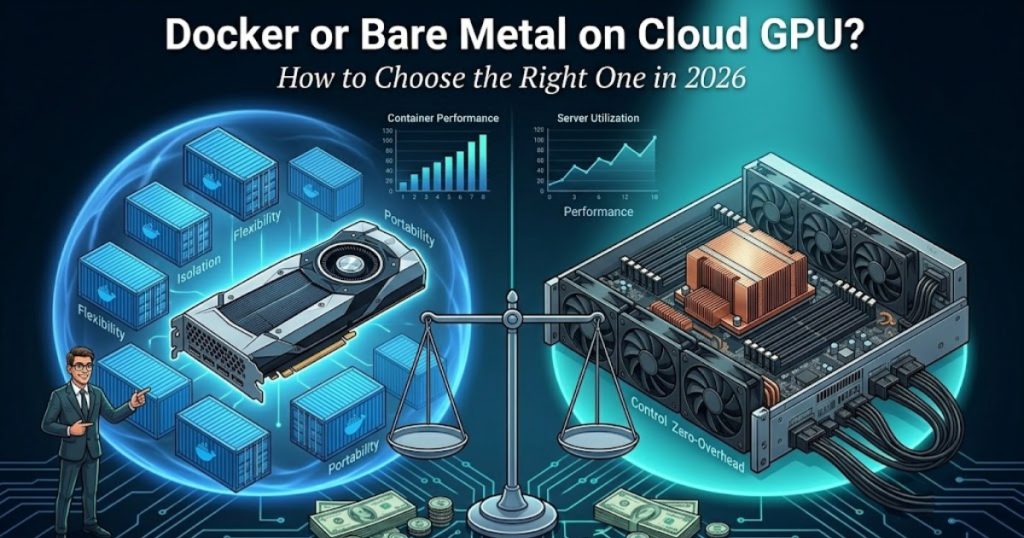

The year 2026 brings massive growth in artificial intelligence. Businesses demand massive computing power to survive. You face a major choice for your infrastructure. The primary debate centers on Docker vs Bare Metal on Cloud GPU. Artificial intelligence tasks require enormous system resources. Startups and large enterprises face identical problems. They must find the right environment for heavy computing tasks. Making the wrong choice costs your business time and money.
You will learn the exact differences between these two setups. This article compares performance, costs, flexibility, and security. You will know exactly which system fits your artificial intelligence goals. A strong infrastructure guarantees smooth business operations. Ensure your choice supports your future digital growth. Read this guide to understand the complete picture clearly.
Also Read : Blackwell GPU on Cloud in 2026: Should You Start Using It Now or Wait?
What is Docker on Cloud GPU?
Docker packages software into standardized units. Developers call these units containers. These containers hold everything the software needs to run properly. Cloud GPU Docker vs Bare Metal comparisons often start right here. Containers share the host operating system. This sharing makes containers extremely lightweight. They start quickly. They move easily between different computers.
You use popular tools to manage them. Docker Compose helps organize multiple containers. Kubernetes helps run hundreds of containers at once. Kubernetes is a traffic director for your software. The system is portable, deployable rapidly and easily, and scalable.
- Scenario 1: You wish to test a new machine learning model. The model is sealed in a package. You send the container to another developer. The developer runs the model instantly without installing extra software.
- Scenario 2: However, if a retailer has a huge volume of traffic predicted for a holiday sale. The technical team spins up twenty extra containers in seconds. The website stays online smoothly. The team removes the extra containers when the sale ends.
- Scenario 3: A young startup builds a new application. They have small budgets. They deploy containers to save money on server costs. The application runs efficiently.
Also Read : Cloud GPU for Beginners: Complete Step-by-Step Guide 2026
What is Bare Metal on Cloud GPU?
Bare Metal means you rent a physical server. You do not share the hardware with anyone else. There are no virtual layers blocking your access. You get direct access to the physical graphics processing unit. This direct access provides maximum performance. Heavy workloads run faster on physical servers.
You install your own operating system. You configure the server exactly as you want. Bare metal vs containerized GPU testing shows physical servers win in raw speed. They provide full control and zero virtualization overhead.
- Scenario 1: Your research team trains a massive language model. The training takes three weeks of constant computing. You rent a physical server. The server is either fully utilized and performance is not impacted by sharing resources or there is no shared resource.
- Scenario 2: A financial company makes millions of trades every second. Every millisecond counts. The firm uses a physical server to guarantee the lowest possible latency. The trades execute instantly.
- Scenario 3: A video production company renders high-definition movies. The rendering software needs uninterrupted graphics processing. The physical server takes care of the rest in a reliable manner, without crashing.
Also Read : Serverless GPU vs Dedicated GPU Instances: Which One Actually Saves You Money in 2026?
Docker vs Bare Metal – Head-to-Head Comparison
Compare the differences between the two options in this table.
| Parameter | Docker on Cloud GPU | Bare Metal on Cloud GPU |
| Performance | Good for most tasks. Has slight speed overhead. | Maximum speed. Zero overhead. |
| Cost | Lower cost. You pay only for resources used. | Higher cost. You pay for the whole server. |
| Flexibility & Scalability | High flexibility. Scales in seconds. | Low flexibility. Takes time to set up new servers. |
| Security & Isolation | Shares the OS core. Isolation is good. | Ultimate security. Fully isolated physical machine. |
| Ease of Use & Management | Easy to deploy. Needs Kubernetes knowledge for scaling. | Requires deep technical knowledge to configure. |
| Deployment Speed | Instant deployment. | Takes longer to provision. |
Finding the Best Cloud GPU setup 2026 requires understanding these exact parameters. Containers win in speed of deployment. Physical servers win in raw performance. Your business goals dictate the correct path forward. Before making a decision, evaluate your budget and abilities beforehand.
Also Read : Cloud vs. Dedicated Servers: The Decision Framework Every CTO Should Know
Pros and Cons of Using Docker on Cloud GPU
There are pros and cons to using Docker on a cloud GPU. Knowing When to use Docker on Cloud GPU helps you save money and time.
Pros of Using Docker:
- Fast starts: Containers boot up in seconds. You do not wait for a full operating system to load.
- Easy sharing: Developers share work effortlessly. The software runs identically on different computers.
- Cost savings: You pack many containers on one server. This efficiency lowers your monthly bills.
Cons of Using Docker:
- Slight slowdowns: The extra software layer uses some processing power. Heavy workloads take slightly longer.
- Complex scaling: Managing thousands of containers requires hard work. You need experts to run Kubernetes effectively.
- Security risks: Containers share the core operating system. One compromised container poses risks to others.
- Scenario 1: A medical research team tests hundreds of small algorithms daily. Containers allow them to test rapidly. They delete the containers after each test.
- Scenario 2: An e-commerce company updates their website features weekly. Containers allow seamless updates without bringing the system offline. The customers never notice the updates happening.
Also Read : 2026 GPU Servers Guide: Cloud vs Dedicated Bare Metal – Smart AI & LLM Hosting Strategy
Pros and Cons of Using Bare Metal on Cloud GPU
Understanding When to choose Bare Metal for GPU workloads ensures your heavy projects succeed. Physical servers offer distinct benefits and specific drawbacks.
Pros of Using Bare Metal:
- Raw power: Your task gets all the resources dedicated to it by the server. You get maximum processing speed.
- Complete control: You manage every single setting. You optimize the hardware for your exact needs.
- Predictable performance: No other users slow down your machine. You know exactly how long tasks will take.
Cons of Using Bare Metal:
- High expenses: You pay for the server even when idle. Unused time wastes your budget.
- Slow setup: Preparing the hardware takes time. You wait hours or days for initial access.
- Hard to scale: Adding more physical servers requires planning. You cannot scale instantly during a sudden traffic spike.
- Scenario 1: Complex molecular simulations are conducted by a pharmaceutical company. The simulations run for a month straight. The physical server handles the constant stress perfectly.
- Scenario 2: The government agency keeps sensitive citizen details. Strict Data isolation is required by privacy laws. The physical server provides the required legal security.
Also Read : Why Bare Metal GPU Servers Are the Backbone of the AI Revolution
Which One Should You Choose? (Decision Framework)
You need a clear plan to decide. Docker vs Bare Metal Cloud GPU which is better depends completely on your specific business requirements. Use this framework to make the right choice.
- Workload type: Choose containers for fast experiments and quick deployments. Choose physical servers for long training sessions. Docker vs Bare Metal for AI workloads requires you to look at your specific daily tasks.
- Team size and technical expertise: Small teams benefit from container simplicity. Large teams with system administrators manage physical servers better.
- Budget and usage pattern: Unpredictable workloads fit containers perfectly. Continuous heavy workloads fit physical servers better.
- Need for speed vs control: If you need to deploy quickly, pick containers. If you need ultimate hardware control, pick physical servers.
Review your answers to these four points. Your correct path will become obvious.
Also Read : GPU for Everyday Business Tasks: From Data Analysis to Chatbots
How Hostrunway Helps with Docker and Bare Metal
Your business needs a reliable partner. Hostrunway acts as your strategic partner in powering digital growth across continents. Hostrunway supports both Docker and Bare Metal deployments seamlessly.
You gain access to multi-geo hosting across 160+ global locations in 60+ countries. This global server location network gives you a local presence with global reach. Hostrunway offers latency-optimized routing. Their global infrastructure ensures fast network routing. Fast routing proves ideal for applications with real-time interactions.
Hostrunway provides custom-built servers. You select the specific processor, memory, storage and operating system you require. Enterprise level security including DDoS protection, all integrated into the system.
You get 24/7 real human support. The support team handles issues personally and quickly. Hostrunway offers flexible billing and upgrade options. You experience no lock-in period. You scale resources up or down month to month. Hostrunway provides instant and fast server provisioning. You launch your projects within hours. They offer both managed and unmanaged options. You get an affordable global hosting solution tailored for your enterprise needs.
Also Read : AMD vs NVIDIA 2026: Which GPU Provider Fits Your Needs? – Honest Comparison
Conclusions
You now understand the differences between containers and physical servers. Containers offer speed, low costs, and easy sharing. Physical servers offer raw power, deep control, and strict security. Your artificial intelligence projects require the correct foundation to succeed. Evaluate your budget, your daily tasks, and your team skills carefully. Pick the solution matching your business goals. A strong infrastructure guarantees smooth operations. Ensure your choice supports your future growth. So make sure you take action in the present so that you can get the best system for your company.
Frequently Asked Questions (FAQs)
Is Docker slower than Bare Metal on GPUs?
Yes. Containers have a slight performance drop. Physical servers process data faster because they have zero software overhead.
Which is more secure – Docker or Bare Metal?
Physical servers offer superior security. They provide complete hardware isolation from other users on the network.
Do companies switch from Docker to Bare Metal later?
Yes. Many companies start with containers. They migrate to physical servers as their data processing needs grow larger.
Is Bare Metal more expensive than Docker?
Yes. Renting an entire physical server costs more money. Money is saved by efficiently sharing hardware resources with containers.
Which is better for beginners?
Containers work best for beginners. They offer simple deployment and easy management tools for new developers.
Does Hostrunway support both Docker and Bare Metal?
Yes. Hostrunway provides infrastructure for both setups. You choose the environment fitting your specific project needs.
How do I decide between the two for my AI project?
Be aware of your budget and processing speed needs. Use containers for testing and physical servers for final model training.
Why do small teams prefer containers?
Small teams use containers for quick testing. Containers allow fast collaboration without complex server setup procedures.