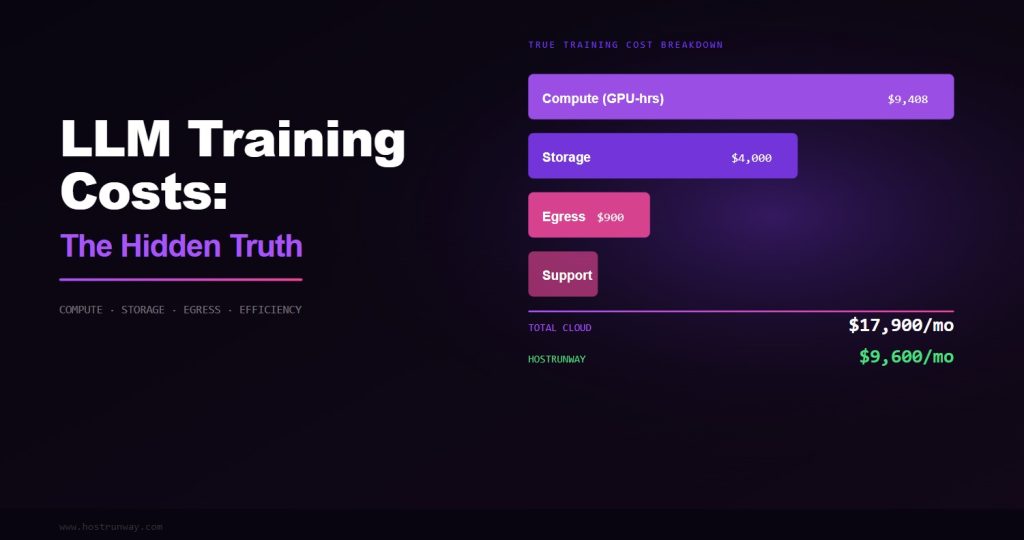

Everyone talks about model architecture and dataset quality. Almost nobody talks about the infrastructure decisions that make or break your training budget. This guide breaks down the real cost drivers in large language model training and how to avoid the most expensive mistakes.
The conversation around large language model training is almost exclusively focused on the things you can see in a paper: architecture decisions, training data quality, scaling laws, and benchmark performance. What gets buried in footnotes — or omitted entirely — is the unglamorous infrastructure layer that determines whether a training run is efficient, reproducible, and affordable, or chaotic, expensive, and full of surprises.
After working with hundreds of AI teams across various stages of their model development journey, the patterns of infrastructure-related cost overruns are remarkably consistent. The good news is that most of them are entirely preventable once you know what to look for.
The Real Cost of a Training Run: Beyond $/GPU/hr
Most people think about training costs in terms of a single number: dollars per GPU-hour multiplied by the number of GPU-hours needed. This mental model is dangerously incomplete. The actual cost of a training run has five components, and $/GPU/hr is only one of them.
Also Read – GPU Dedicated Server vs Cloud: Which is Best for Your AI and Compute Needs in 2026?
The five real cost components of a training run are: compute cost (the $/GPU/hr you think about), storage cost (checkpoints, datasets, logs), network cost (egress, inter-node traffic on some providers), efficiency factor (how much of your paid GPU-time is actually doing useful computation), and debugging overhead (engineer time spent dealing with infrastructure failures, performance anomalies, and environment issues).
Teams that optimize only for $/GPU/hr and ignore the other four components consistently overspend by 40–100% against their initial budget estimates. The efficiency factor is particularly insidious because it is invisible unless you are actively measuring it.
The Three Most Expensive Infrastructure Mistakes in LLM Training
Mistake 1: Wrong Storage Tier Makes the GPU the Bottleneck
This is the infrastructure mistake I see most often, and it is spectacularly easy to make. The symptoms appear late: your GPU is fully provisioned, your training script looks correct, your initial benchmark showed reasonable performance — but your actual training throughput is 60% of what you expected.
The culprit is almost always the storage subsystem. LLM training has two distinct storage-intensive phases that many teams do not fully account for during infrastructure planning. The first is data loading: streaming training tokens from storage to powerful GPUs memory during the forward pass. The second is checkpointing: periodically writing the entire model state to durable storage for fault tolerance and evaluation.
For a 70B parameter model at BF16 precision, a single model checkpoint is approximately 140GB. If your storage system delivers 1 GB/s sequential write throughput — a typical figure for network-attached cloud storage — that checkpoint takes 140 seconds. If you checkpoint every 30 minutes, you are spending nearly 8% of your training time writing checkpoints. On a 30-day training run, that is 2.4 days of pure I/O overhead.
Also read – What is a Dedicated GPU Server? A Complete Guide
The solution is local NVMe storage with sustained sequential write throughput of 20+ GB/s. At that throughput, the same 140GB checkpoint completes in 7 seconds — less than 0.4% overhead even at 30-minute intervals. On an H100 bare metal node at Hostrunway, local NVMe RAID delivers 30+ GB/s. This is not a luxury; it is table stakes for serious LLM training.
Rule of thumb: Your checkpoint throughput should be high enough that checkpointing a full model state in 10 seconds or less is achievable. If your storage cannot meet this bar, I/O will bottleneck your training pipeline.
Mistake 2: Shared Tenancy Creates Unpredictable Latency Spikes
NCCL (NVIDIA Collective Communications Library) is the foundation of most distributed LLM training. It implements the AllReduce, AllGather, and ReduceScatter operations that allow gradients and activations to be synchronized across multiple GPUs. These collective operations require all participating GPUs to be ready simultaneously — any straggler causes the entire batch to wait.
In a shared tenancy environment, “noisy neighbors” — other workloads on the same physical host or network segment consuming burst CPU, memory bandwidth, or network capacity — create unpredictable straggler events. You may see 95% efficiency for 50 minutes, then a 30-second NCCL timeout event because a neighboring VM triggered a garbage collection burst that saturated the memory controller shared between your GPU and the hypervisor.
These events are difficult to diagnose because they appear intermittent and do not trigger obvious error messages — just silent slowdowns that are hard to attribute to a specific cause. On bare metal with single-tenant isolation, this entire class of problem disappears. Your GPU memory controller, CPU, and network are dedicated exclusively to your workload.
Mistake 3: Over-Provisioning VRAM for Training, Under-Provisioning for Inference
There is a common misconception that “more VRAM is always better” in GPU selection for AI workloads. In reality, VRAM requirements are tightly coupled to your specific workload, and over-provisioning costs real money while under-provisioning for the wrong workload creates OOM (Out Of Memory) errors at critical moments.
Also Read – Unlocking AI Power in 2026: Top GPUs from RTX 5090 to Affordable Picks for Smarter Setups
For training, VRAM requirements scale with batch size, sequence length, model parameter count, optimizer state, and gradient accumulation configuration. For a 7B parameter model with typical batch sizes and the Adam optimizer, 40GB of VRAM is often sufficient — meaning an A100 40GB or two RTX 4090 24GB cards can handle it. Paying for H100 80GB is unnecessary and wastes budget that could fund more training iterations.
For inference, however, the calculus flips. VRAM determines what models you can serve and at what context lengths. An H100 80GB can serve a 70B parameter model at full FP16 precision with room for long contexts. An A100 40GB cannot. Buying inference nodes based on training VRAM requirements rather than serving requirements leads to either wasted capacity or inability to serve the models you actually build.
The Efficiency Factor: How Much of Your GPU Time Is Wasted?
GPU utilization — the percentage of time your GPU’s compute engines are actually performing mathematical operations — is the single most important metric for training efficiency. Every GPU-hour you pay for that is not performing computation is pure waste.
Sources of GPU under-utilization in LLM training include: data preprocessing bottlenecks (CPU preprocessing cannot keep up with GPU consumption), checkpoint I/O overhead (GPU waits while model state is written), NCCL synchronization overhead (GPUs wait for each other during collective operations), Python overhead in training loops (GIL contention, interpreter overhead), and memory fragmentation (intermittent OOM events requiring gradient offloading or recomputation).
Also read – The 2026 Local LLM Boom – Why Speed and Privacy Matter Now
World-class training efficiency targets GPU utilization above 85% measured over the full training run, not just peak utilization during the forward and backward passes. Teams achieving this level of efficiency on H100 hardware consistently report effective costs 30–50% below teams running the same models at 65% utilization on nominally cheaper infrastructure.
85%+ Target GPU utilization for efficient training
65% Typical shared cloud VM utilization
40% Efficiency improvement from proper infra
30% Average storage overhead on slow systems
Separating Your Training and Inference Infrastructure
One of the highest-impact infrastructure decisions an AI team can make is separating training infrastructure from inference infrastructure. These two workloads have fundamentally different characteristics and are optimally served by different hardware profiles.
Training workloads prioritize: maximum FLOPS per dollar, high memory bandwidth for gradient computation, large VRAM for large batch sizes and long sequences, and high-bandwidth inter-GPU communication for distributed training. The optimal hardware is H100 SXM5 or H200 in multi-GPU configurations with NVLink fabric.
Inference workloads prioritize: low latency per token, high throughput (requests per second), memory efficiency for serving multiple concurrent requests, and cost per token. For these workloads, L40S, A100, or even RTX 4090 nodes often deliver better economics than H100 clusters that are underutilized during low-traffic periods.
Teams that share infrastructure between training and inference typically make both workloads more expensive: training jobs are interrupted by inference traffic spikes, inference serves at suboptimal latency due to periodic GPU context switching with training processes, and neither workload is running on the hardware profile best suited to it.
Framework-Level Infrastructure Considerations
The training framework you choose has significant infrastructure implications that are rarely discussed in framework comparison articles. PyTorch with FSDP (Fully Sharded Data Parallel) and DeepSpeed ZeRO Stage 3 both dramatically reduce peak VRAM requirements by sharding model parameters, gradients, and optimizer states across GPUs — but both require high-bandwidth inter-GPU communication to perform the re-gather operations they need during forward and backward passes.
Also Read – RTX 5090 vs RTX 4090/Used 3090 in 2026 – Is the Upgrade Worth It for Local LLMs?
This means that the value of NVLink bandwidth is not uniform across training configurations. A team running a 7B model with standard data parallelism sees modest NVLink benefit. A team running a 70B model with FSDP or ZeRO Stage 3 sees enormous NVLink benefit, because every forward and backward pass involves gathering and re-sharding 140GB+ of model state across 8 GPUs. NVLink 4.0 at 900 GB/s makes this practical. PCIe at 64 GB/s does not.
Practical Infrastructure Checklist for LLM Training
Based on working with hundreds of training teams, here is the infrastructure checklist that separates efficient training operations from expensive ones:
- Storage throughput: Verify local NVMe delivers 20+ GB/s sustained sequential write before committing to a training run. Run a benchmark. Do not trust spec sheets alone.
- GPU utilization monitoring: Deploy DCGM (Data Center GPU Manager) and Prometheus from day one. Set an alert if training-time GPU utilization drops below 80% — investigate immediately.
- Checkpoint strategy: Calculate your checkpoint overhead as a percentage of training time before starting. If it exceeds 2%, either increase checkpoint interval or upgrade storage.
- Inter-GPU bandwidth: Confirm NVLink topology with nvidia-smi nvlink –status before starting multi-GPU jobs. Verify you have full mesh connectivity, not PCIe fallback.
- Single-tenant isolation: Confirm your gpu provider offers dedicated bare metal server for your training nodes. “No noisy neighbors” is not a marketing claim — it is a technical requirement for reproducible benchmarks.
- Separate inference nodes: Never serve production inference traffic from the same nodes running active training jobs. Budget for separate inference infrastructure from the start.
The Bottom Line on LLM Training Infrastructure Costs
The most expensive GPU is the one running at 65% utilization when it could be running at 95%. The most expensive storage is the one turning your 3-day training run into a 4.5-day training run due to I/O overhead. The most expensive infrastructure decision is the one you realize was wrong on day 10 of a 30-day training job.
Infrastructure for LLM training is not a line item to optimize in isolation. It is a multiplier on every other investment your team makes in data quality, model architecture, and engineering time. Get the infrastructure right, and your engineers focus on building better models. Get it wrong, and they spend half their time debugging environment issues, re-running failed training jobs, and waiting for checkpoints to write.
The teams consistently shipping state-of-the-art models are not necessarily the ones with the biggest compute budgets. They are the ones who run that compute at the highest efficiency. Infrastructure is how you close the gap between the compute you pay for and the compute you actually use.