
The “just use the cloud” answer to every infrastructure question is both lazy and often expensive. Here is a rigorous framework for making the cloud vs. dedicated decision correctly for each workload type — and the math that drives it.
In the early days of cloud services, the default answer to any infrastructure question was simple: use the cloud. Elastic scaling, managed services, zero capital expenditure, global reach in minutes — the advantages were real and the drawbacks were easy to dismiss for teams that were scaling fast and had little operational infrastructure experience.
More than a decade later, the conversation has matured considerably. The companies that have grown to significant scale on public cloud have also accumulated the operational data to make informed comparisons, and the data tells a more nuanced story than “cloud is always better.” The right infrastructure choice depends on workload characteristics, budget structure, compliance requirements, team capabilities, and growth trajectory — and making the wrong choice is expensive in ways that often do not manifest until years into the relationship with the wrong provider.
The Three Questions That Determine Your Infrastructure Choice
After working with hundreds of technical teams on infrastructure decisions, the framework I have found most reliable reduces to three questions. Answering these honestly, with data rather than intuition, drives the right decision in the vast majority of cases.
Question 1: Is Your Workload Predictable?
Predictability refers to both the volume and timing of compute demand. A workload is predictable if you can specify, within a reasonable margin of error, how much compute you will need on any given hour of any given day. A workload is unpredictable if demand is bursty, seasonal, or dependent on factors you cannot control in advance.
Examples of predictable workloads: a production AI inference endpoint serving a product with stable user growth, a batch processing pipeline that runs nightly, a scientific simulation cluster running scheduled jobs, a database server for a mature application with known traffic patterns.
Also Read – LLM Training in 2026: What Nobody Tells You About Infrastructure Costs
Examples of unpredictable workloads: a consumer application that might go viral, an API that is exposed to third parties whose usage you cannot predict, a development environment used by a team whose project requirements change rapidly.
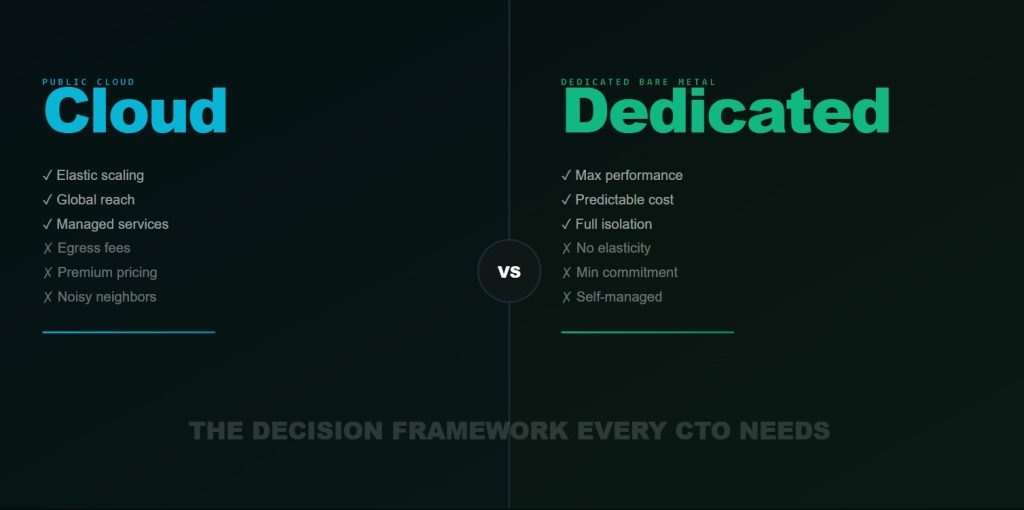
For predictable workloads, dedicated server infrastructure wins on cost, almost without exception. The reason is simple: cloud vps infrastructure pricing is designed to capture premium from elasticity. You pay for the option to scale up or down on demand. If you do not exercise that option — if your workload is stable — you are paying for a feature you are not using.
For unpredictable workloads, cloud wins on flexibility. The ability to provision 100 additional nodes in response to unexpected demand, then release them when demand subsides, is genuinely valuable and worth the premium when that elasticity is actually exercised.
Question 2: Do You Need 100% of the Hardware?
This question addresses resource utilization. A workload that saturates its hardware — running at 80%+ CPU utilization, 90%+ memory utilization, 90%+ GPU utilization — will consume the full capacity of whatever hardware it runs on. The overhead of virtualization is real but modest relative to the cost advantage of dedicated hardware.
A workload that uses 20% of its provisioned resources 80% of the time is a poor candidate for dedicated hardware. You are paying for four times the hardware you need for most of the day. Shared infrastructure — VMs, containers on shared nodes — matches your actual consumption patterns and may represent better economics despite higher per-unit pricing.
GPU workloads are particularly important to evaluate carefully here. A GPU that is idle 70% of the time because it is waiting for CPU preprocessing, data loading, or network I/O is not a workload that needs dedicated hardware. Fixing the bottleneck that causes GPU idleness is usually more valuable than upgrading the hardware tier.
Question 3: Are You GPU Compute-Heavy?
This question specifically addresses the GPU vs. general compute dimension. GPU workloads — AI training, inference, scientific simulation, rendering, video transcoding — have economics that differ significantly from general-purpose compute workloads.
Also Read – LLM Training in 2026: What Nobody Tells You About Infrastructure Costs
The hyperscalers price GPU VMs at a premium that reflects both the scarcity of GPU hardware and the operational complexity of maintaining GPU infrastructure at scale. On-demand A10G GPU VMs on AWS run approximately $3.20/hour. On-demand H100 VMs, when available, run $12–16/hour depending on configuration. These prices reflect the hyperscaler’s blended cost of hardware, operations, and margin.
Bare metal GPU servers on dedicated infrastructure can be priced 40–70% below these figures for equivalent hardware, because the economics of dedicated provisioning eliminate the elasticity premium and the multi-tenancy overhead. For teams with stable, high-utilization GPU workloads, this price difference is enormous.
The Total Cost of Ownership Framework
The framework above determines which provider category is right for your workload. The TCO (Total Cost of Ownership) analysis determines the actual cost difference. TCO for infrastructure includes five components that must all be calculated to arrive at a meaningful comparison.
Compute cost: The $/hour for your instances, including reserved instance discounts if applicable. This is the number most teams start and stop with, which explains why so many TCO analyses are wrong.
Storage cost: Block storage, object storage, snapshot storage, and backup storage all have real costs that accumulate quickly. AWS gp3 EBS costs $0.08/GB/month. A team with 50TB of persistent storage pays $4,000/month in storage alone before touching compute costs.
Egress cost: Every byte that leaves your cloud vps provider‘s network is billed. AWS charges $0.09/GB for outbound data transfer. A production AI system serving inference responses or streaming model outputs at 10TB/month generates $900/month in egress fees before any compute cost is included.
Operational overhead: Cloud infrastructure requires significant engineering investment to operate well. FinOps to manage costs, cloud architecture expertise to design resilient systems, security engineering to configure IAM correctly, SRE to manage multi-cloud failover. These costs are real and large, though they are spread across your engineering team and rarely appear as a line item.
Support cost: AWS Business Support starts at $100/month or 10% of monthly bill (whichever is higher). Enterprise Support starts at $15,000/month. For a team spending $100K/month on AWS, Business Support alone adds $10K/month.
The complete TCO formula: Total Infrastructure Cost = Compute + Storage + Egress + Engineering Overhead (FTE hours × loaded salary) + Support Tier. Teams that compare only compute costs consistently underestimate their true cloud spend by 30–50%.
The Numbers: A Realistic Comparison
To make this framework concrete, let us run a realistic TCO comparison for a common scenario: an AI company running continuous LLM training on 8× H100 GPUs, with production inference on 4× A100 GPUs.
On public cloud (AWS), representative monthly costs: 8× H100 GPU VM (p4de.24xlarge or similar), 672 GPU-hours/month at ~$14/GPU-hr on-demand: $9,408. 4× A100 inference VM (p4d.24xlarge), 336 GPU-hours/month at $6/GPU-hr: $2,016. 50TB EBS storage: $4,000. Data egress at 10TB/month: $900. AWS Business Support: $1,600. Total: approximately $17,900/month.
Also Read – 2026 GPU Servers Guide: Cloud vs Dedicated Bare Metal – Smart AI & LLM Hosting Strategy
On dedicated bare metal (Hostrunway): 8× H100 SXM5 bare metal node, monthly reserved: approximately $7,200. 4× A100 bare metal node, monthly reserved: approximately $2,400. Storage included in node pricing. No egress fees for inter-datacenter traffic. Support included. Total: approximately $9,600/month.
The difference: $8,300/month, or $99,600/year. For this specific workload profile, dedicated infrastructure saves approximately the fully-loaded cost of one junior engineer per year — purely from the infrastructure choice.
When Cloud Wins: The Honest Case for Flexibility
The framework above is not an argument for dedicated infrastructure in all cases. There are genuine workload profiles where cloud wins — not on cost, but on total value including flexibility.
Cloud wins when your GPU demand varies by more than 4× between your peak and trough usage periods. If you train models in intense bursts followed by weeks of minimal compute usage, the flexibility to scale to 64 GPUs for two weeks and then back to 8 GPUs is worth the premium. You would pay for idle dedicated nodes during the trough periods, eliminating the cost advantage.
Cloud wins when you genuinely need global reach. Deploying inference endpoints in 15 regions simultaneously is trivially simple on AWS and requires significant operational investment on dedicated infrastructure.
Also Read – Why Bare Metal GPU Servers Are the Backbone of the AI Revolution
Cloud wins when you are in the early stages of figuring out your workload. If you do not yet know whether your steady-state GPU requirements will be 8 nodes or 80 nodes, committing to dedicated infrastructure is premature. Use cloud to characterize your workload, then migrate when you have enough data to make the commitment confidently.
The Hybrid Architecture: Best of Both
The most sophisticated teams are not choosing between cloud and dedicated — they are using both strategically, each for the workloads it serves best. The canonical hybrid architecture for AI companies looks like this: dedicated bare metal GPU nodes for steady-state training and production inference (cost-optimized, high-performance), cloud GPU VMs for burst training capacity and experimentation (flexible, no capital commitment), and cloud general-purpose compute for application servers, databases, and managed services (where hyperscalers’ breadth of services creates real value).
This architecture requires infrastructure-as-code discipline (Terraform or Pulumi) to manage multiple providers coherently, and it requires engineering investment in abstractions that allow workloads to be moved between providers without significant code changes. That investment pays dividends throughout the infrastructure lifecycle, because no provider relationship should be treated as permanent.